
CloudWMS
CloudWMS
  • Website
  • Status
  • Support
  • Introduction

    • Getting started
    • FAQ
  • Account

    • Introduction
    • Global account page
    • Edit global account
    • Create user account
    • Edit user account
    • Remove user from your organization
    • Two Factor authentication
  • Products

    • Introduction
      • Product overview
      • What actions can I perform here?
    • Create products
    • View, edit and delete product
    • Bundle products
    • Inventory log
  • Purchase orders

    • Introduction
    • Overview
    • Create a purchase order
    • Import with Excel-file
    • View and edit a purchase order
    • Cancel a purchase order
  • Orders

    • Explainer and statusses
    • Overview
    • Create an order
    • Import with Excel-file
    • View and edit an order
    • Cancel an order
  • Returns

    • Introduction
    • Overview
    • Create a return
    • Cancel a return
    • Create return labels
  • Logistics

    • Create a supplier
    • Generate a CMR
  • Address book

    • Overview
    • Create a contact
  • Finances

    • Explainer
  • Technical guide

    • Introduction
    • Compatible devices and browsers
    • Two Factor authentication
  • Webshop API connection

    • Introduction
    • Guide

Introduction to products

In this section, we’ll tell you everything about managing your products in CloudWMS.

Product overview

If you click on Products in the menu, you will be taken to the products page. Here you can find all your products.
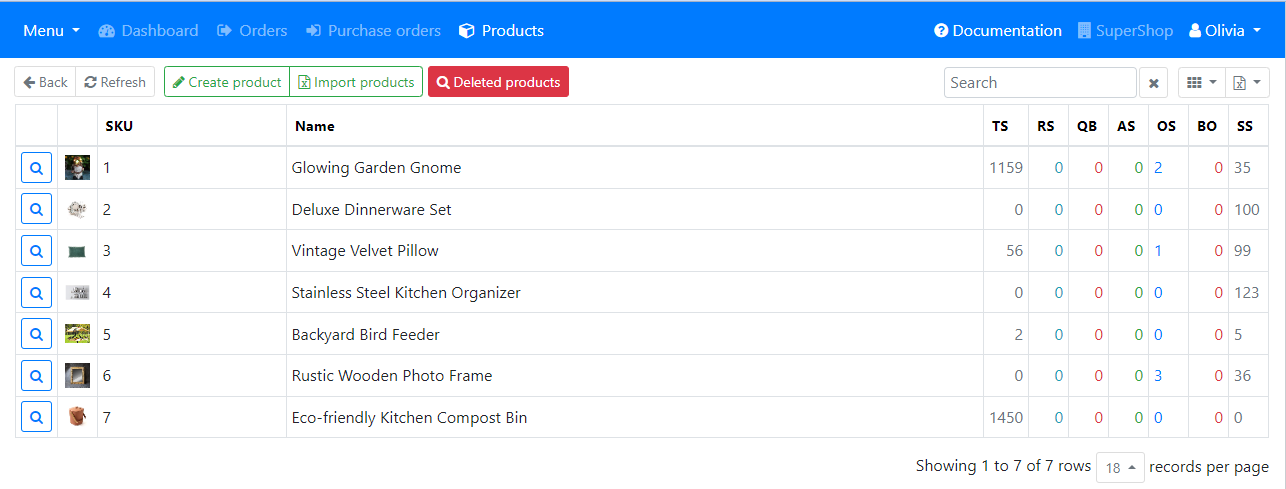
Screenshot of products overview page

What actions can I perform here?

From this page you can perform the following actions:

  • Create product
  • View product
  • Edit product
  • Remove product

You will also see the stock and status information of your product to the right of the product name.

PreviousTwo Factor authentication
NextCreate products

© Copyright 2026 CloudWMS. All rights reserved.